
Language Learning: Pingo AI
Pingo AI, Inc.Education
4.71.08K Reviews
- Version
- 5.4.8
- Installs
- 5.00M
- Age Rating
- Everyone
Screenshots

Our Review of Language Learning: Pingo AI
 Analysis by Appyee
When I pick a language-learning app, I want to know two things early: can I fit it into an ordinary day, and will it help me do more than recognize words on a screen? Pingo AI is an education app built around AI-supported practice, with a clear emphasis on speaking. In my experience, that makes it most appealing as a low-pressure way to build a daily habit—not as a complete replacement for classes, books, or conversations with people.
Who gets the most from short practice sessions?
I’d recommend trying it if you’re starting Korean, Spanish, English, French, or another language it offers and want an easy place to practise without arranging a lesson. It can also suit someone who has studied before but needs a gentle routine to get words and spoken phrases moving again. The app is free to download, while in-app purchases range from $14.99 to $99.99 per item, so I’d explore the free experience before deciding whether a paid option makes sense for your habits.
A realistic use case is a few minutes between tasks: choose one small practice session, say the answers aloud rather than tapping through silently, and note any phrase you hesitate over. Later, revisit that phrase in a real context—ordering lunch, greeting a colleague, or asking for directions. That extra step matters. An app can help you rehearse, but remembering to use a phrase with a real person is what tests whether it has stuck.
Speaking practice, with sensible expectations
The speech-recognition element is the feature I’d lean on when I’m worried about pronunciation. It gives practice a more active feel than simply reviewing a list of translations, and it can make it easier to notice which sounds deserve another attempt. Still, I wouldn’t treat a successful recognition result as proof that every part of my accent, rhythm, or word choice is natural. I’d use it as a useful checkpoint, then listen carefully and compare my own attempts over time.
One practical tip is to keep a tiny “repeat later” list outside the app for phrases that repeatedly trip you up. Grouping those phrases by situation—introductions, travel, or work—can make your next practice session more purposeful than jumping randomly between topics. This is especially useful if your goal is a specific upcoming interaction rather than broad study. If your main need is detailed grammar instruction or feedback on a long piece of writing, I’d pair Pingo AI with a textbook, teacher, or dedicated writing tool instead.
How it fits beside other learning options
Compared with a flashcard-only routine, Pingo AI’s speaking practice gives you a reason to produce language aloud, not just recognize a prompt. Compared with a live tutor, it is easier to use whenever a spare moment appears, but it cannot provide the same personal back-and-forth or interpret every nuance of what you mean. I see it as a bridge between solo study and real conversation: useful for building confidence before speaking, but strongest when you also make room for human practice.
If you already have a structured course that explains grammar in depth, I wouldn’t abandon it for this app. Instead, use Pingo AI to practise vocabulary and speaking around the topics you are studying. If you dislike phone-based exercises or need a teacher to keep you accountable, a class or tutor may be a better fit. The right choice depends on whether you want flexible repetition or detailed, personal guidance.
What to check before making it a routine
Because the app combines practice types, I’d pay attention to which ones actually help you recall language later. A quiz can feel satisfying while still being easier than speaking from memory. To avoid that trap, try to answer aloud before looking at options, and pause after a correction to say the phrase again without reading it. That small change turns a quick interaction into a more useful retrieval exercise.
I’d also choose one target language and a modest daily goal at first, rather than starting several courses at once. Switching between languages can be enjoyable, but it may make it harder to tell whether you’re retaining what you studied. If your schedule is unpredictable, a short, repeatable session is more realistic than planning a long block you’ll often skip. The app’s motivational elements may help you return, but a streak or reward is only valuable if the practice itself serves your goal.
Speed, heavier use, and reliability
For this kind of app, “fast” is less about racing through screens and more about getting into a useful exercise without losing your focus. Pingo AI’s straightforward layout helps make that transition feel simple. Speaking exercises naturally take longer than tapping through flashcards, and I’d allow a little extra time when I want to listen, try a phrase again, and think about a correction rather than rushing to finish.
On a busy day, the heaviest use is likely to be a longer stretch of mixed practice: switching between exercises, repeating spoken answers, and reviewing phrases that need work. I’d break that into shorter rounds. It is easier to stay attentive when I stop before practice turns into automatic tapping, and the pause gives me a chance to decide what I want to work on next. That approach is particularly helpful when I’m learning after work and my concentration is already limited.
I’d judge reliability by whether the app lets me return to practice consistently, not by expecting every recognition attempt to be perfect. Speech input can be affected by how clearly I speak and by the setting around me, so I’d practise in a reasonably quiet place when pronunciation feedback matters. If an answer seems wrong, I’d say it again at a steady pace before concluding that the lesson or recognition is at fault. For important pronunciation questions, a teacher or fluent speaker remains a better final reference.
Device fit and practical limits
Pingo AI is rated for Everyone and requires Android 8.0 or later. It is developed by Pingo AI, Inc., and version 4.2.1 is the current version. Those details make it straightforward to check basic compatibility before installing, but they don’t tell me how the app will feel on every individual device. If a phone is older or already crowded with apps, I’d leave enough free storage for normal updates and close other demanding tasks if performance feels sluggish.
Learning with speech also makes the surroundings part of the setup. A quiet room is more useful than a noisy bus when I want to judge pronunciation, while silent review is easier to fit into public transport or a waiting room. I wouldn’t assume every activity works without an internet connection; if offline access matters to you, check what remains available on your device before relying on it during travel. That is a sensible check for any app you plan to use away from home.
What the track record tells me—and what it doesn’t
The app has an average rating of 4.8 from around 89,000 ratings, with more than 400 written reviews and over a million installs. That level of adoption suggests many learners have found a reason to try it, but popularity alone cannot tell me whether its teaching style suits my goals. I’d treat the numbers as a helpful sign of interest, then make my own decision based on how well the exercises fit the language and routine I need.
The clearest limitation is the one shared by most self-guided language apps: practice can become too comfortable if I only complete prompts inside the app. Pingo AI can support repetition and speaking confidence, but progress still depends on returning regularly and using the language beyond a screen. If I need rigorous correction, advanced grammar explanations, or conversation with a patient human partner, I’d choose a class, tutor, or language exchange as the main tool and keep the app as a supplement.
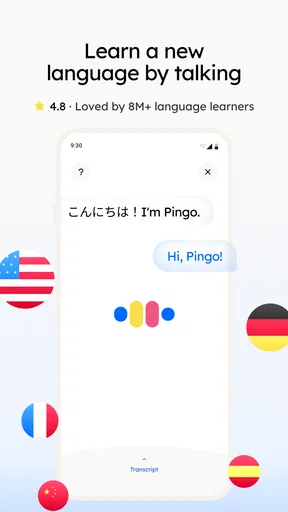
Imagine having a language tutor right in your pocket, ready to help you master a new language whenever and wherever you want. That's exactly what Pingo AI promises to deliver. So, I decided to give it a whirl and see if it lives up to the hype. Spoiler alert: it’s a pretty nifty little app!
First Impressions and User Interface
The first thing that struck me about Pingo AI was its clean and colorful interface. It’s designed with a minimalistic approach, making it super easy to navigate. The layout is intuitive, and even if you’re not a tech-savvy person, you’ll find your way around without any hassle. Everything is categorized neatly, so you know exactly where to go to find what you need. Plus, the vibrant colors are not just easy on the eyes; they actually make learning feel more fun and engaging.
Getting Started with Pingo AI
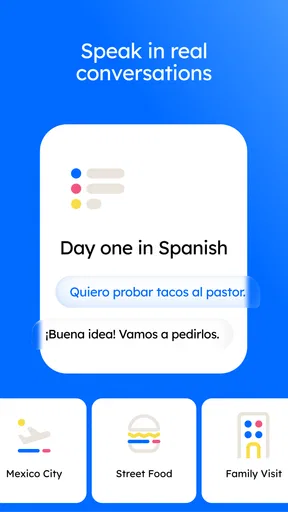
Setting up the app was pretty straightforward. After downloading it, you’re prompted to select the language you want to learn. They offer a decent range of languages, from Spanish and French to Mandarin and Japanese. Once you’ve picked your language, you’re guided through a quick assessment to determine your current proficiency level. This ensures that the lessons are tailored to your specific needs, which I found to be a really thoughtful touch.
Features That Stand Out
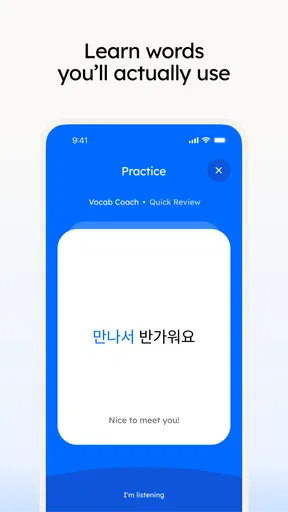
One of the standout features of Pingo AI is its adaptive learning technology. It uses AI to track your progress and adjusts the difficulty of the lessons accordingly. This means you’re always challenged just enough to keep improving without feeling overwhelmed. The app also incorporates a variety of learning methods, including quizzes, flashcards, and interactive exercises. This diversity keeps things fresh and prevents the learning process from becoming monotonous.
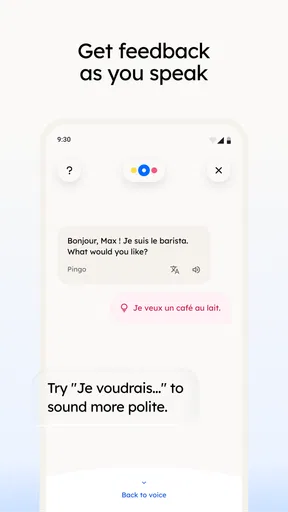
Another cool feature is the speech recognition tool. It’s like having a personal tutor who corrects your pronunciation on the spot. I was a bit skeptical about its accuracy at first, but it does a surprisingly good job of picking up on subtle pronunciation errors. This feature is a game-changer for language learners who want to improve their speaking skills.
Engagement and Motivation
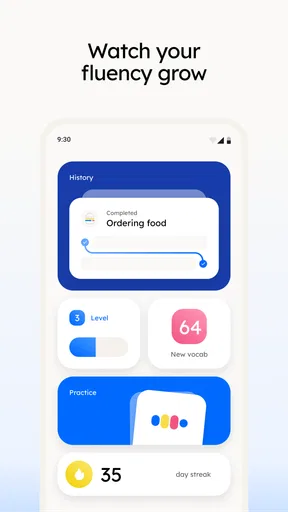
Let’s talk about motivation because, let’s face it, learning a language is no small feat. Pingo AI has incorporated a clever reward system that keeps you coming back for more. You earn points for completing lessons and can unlock achievements as you progress. There’s also a leaderboard feature for those who thrive on a bit of friendly competition.
But what really keeps you motivated is the sense of accomplishment you feel after each lesson. The app breaks down the learning process into manageable chunks, so you’re always making progress, even if it’s just a little bit each day. It’s this steady progress that makes the learning journey feel doable and rewarding.
Accessibility and Flexibility
One of the best things about Pingo AI is its flexibility. You can learn at your own pace and fit the lessons around your schedule. Whether you have five minutes on your lunch break or a couple of hours on a lazy Sunday, the app is ready when you are. Plus, since everything is stored on your device, you can learn offline, which is perfect for those times when you’re on the go and don’t have access to Wi-Fi.
Final Thoughts
So, is Pingo AI worth downloading? Absolutely! It’s a fun, engaging, and effective way to learn a new language. Whether you’re a complete beginner or looking to brush up on your skills, this app has something to offer. The combination of a user-friendly interface, adaptive learning technology, and motivational features makes it a standout choice in the crowded world of language learning apps.
If you’re serious about picking up a new language, give Pingo AI a try. It might just become your new favorite learning companion!
Privacy and Permissions
See what permissions an app requests and how it handles your data.
- Photos/Media/Files
- read the contents of your USB storage, modify or delete the contents of your USB storage
- Storage
- read the contents of your USB storage, modify or delete the contents of your USB storage
- Camera
- take pictures and videos
- Microphone
- record audio
- Wi-Fi connection information
- view Wi-Fi connections
- Other
- view network connections, pair with Bluetooth devices, access Bluetooth settings, full network access, change your audio settings, run at startup, draw over other apps, control vibration, prevent device from sleeping, Google Play license check
Verdict
Strengths of Language Learning: Pingo AI
- Intuitive interface for easy navigation.
- Wide variety of languages available.
- Real-time pronunciation feedback.
- Personalized learning paths.
- Interactive games enhance learning.
Limitations of Language Learning: Pingo AI
- Limited offline functionality.
- In-app purchases can be costly.
- Requires constant internet connection.
- Some languages lack advanced lessons.
- Occasional app crashes reported.
Similar Picks in This Category
View All
Duolingo: Language Lessons
Duolingo4.7

Google Classroom
Google LLC2.8

Unacademy: Learn & Crack Exams
Unacademy3.2

Bible App for Kids
Life.Church4.4

Cake - Learn English & Korean
Cake Corp.4.7

Brainly: AI Homework Helper
Brainly4.5
Frequently Asked Questions
What is Pingo AI and how does it help with language learning?
Pingo AI is a cutting-edge language learning app that leverages artificial intelligence to provide personalized lessons and feedback. It adapts to your learning pace and style, offering interactive exercises, quizzes, and conversation practice. The AI analyzes your progress and suggests specific areas for improvement, making it an efficient tool for mastering a new language.
What languages can I learn with Pingo AI?
Pingo AI offers a wide range of languages to learn, including popular choices like Spanish, French, German, Mandarin, and Japanese. The app continuously updates its language offerings, so users can expect more languages to be added over time. This makes it an excellent choice for both beginners and advanced learners seeking to expand their linguistic skills.
Is Pingo AI suitable for beginners?
Yes, Pingo AI is designed to cater to learners at all levels, including complete beginners. The app starts with fundamental vocabulary and grammar, gradually increasing in complexity. Its interactive exercises and AI-driven feedback ensure that beginners can build a strong foundation while maintaining motivation and interest through engaging content.
Does Pingo AI require an internet connection?
While Pingo AI offers offline capabilities for certain lessons and exercises, an internet connection is required for full functionality. This includes accessing the latest updates, syncing progress across devices, and participating in real-time conversation practice with other users. It's important to have internet access periodically to maximize the app's features.
How does Pingo AI handle user privacy and data security?
Pingo AI prioritizes user privacy and data security by implementing robust encryption and secure servers to protect personal information. The app collects minimal data necessary for enhancing the learning experience and does not share user data with third parties. Users can review and manage their data settings within the app’s privacy options.
